Your best moments to talk to a merchant are the day they install, the days before their trial ends, and the week after they cancel. A generic email tool doesn't know any of that: it doesn't know who's on a trial, who pays what, or who just left. So the emails go out late, to the wrong stores, or not at all, and you never learn which one actually brought a subscriber.
Four things Emails & Flows unlocks
Flows that start on their own
A welcome series the day a store installs, a nudge three days before a trial ends, a win-back after an uninstall. Set it up once and every new store gets the right email at the right time.
Segments from your real billing data
Target stores by plan, trial status, trial end date, monthly spend, lifetime value, install date, cancellation or App Store review. Segments keep updating on their own as stores install, pay and leave.
The revenue each email brings in
When a store clicks an email and then subscribes, upgrades or comes back within 30 days, the email gets the credit. Every campaign, every flow and every email in a flow shows its conversions and the monthly revenue they're worth.
Sent from your own domain
Merchants see your name and your domain, not ours. Unsubscribes, bounces and complaints are handled for you, so your sender reputation stays clean.
The precise capabilities
Not a marketing summary, what the feature actually does, in the same depth a customer success conversation would cover.
Flows
- Start a flow when your app sends an event (an install, a plan change), when a store is added to a list, or when a store enters a segment, like 'trial ends within 3 days'.
- Chain emails and waits. Each email can have its own conditions, so a store that already upgraded skips the upgrade nudge.
- Stores can leave the flow when they leave its segment, so nobody gets a trial reminder after they've paid.
- Opens, clicks and revenue on every email in the flow, so you know which step works.
Campaigns
- Announce a feature to every store, or only the ones it matters to: one plan, one country, stores installed this month.
- See how many stores a campaign will reach before you send it. Send now or schedule it.
- After sending: delivered, opens, clicks, bounces, complaints, and the stores that subscribed, upgraded or came back after clicking.
Segments and contacts
- Your app adds stores as contacts with a few lines of code, or you import a CSV. Shopify doesn't share merchant emails with partners, so this part comes from you.
- Connect your Shopify Partner account and every contact gets its billing data: paying or not, trial and trial end, plan, monthly spend, lifetime value, install and uninstall dates, cancellation and review.
- Filter your Customers list, then save it as a segment in one click. It keeps updating as stores install, pay and leave.
Writing and sending
- A block editor with personalization (the merchant's name, their store, or any property your app sends) and a fallback when a value is missing.
- Preview on desktop and mobile, and as a real contact before you send.
- Unsubscribe groups, so a store can stop product news but keep its billing emails.
- A daily sending limit that grows as you send, to protect your reputation while you ramp up.
What you see in your dashboard
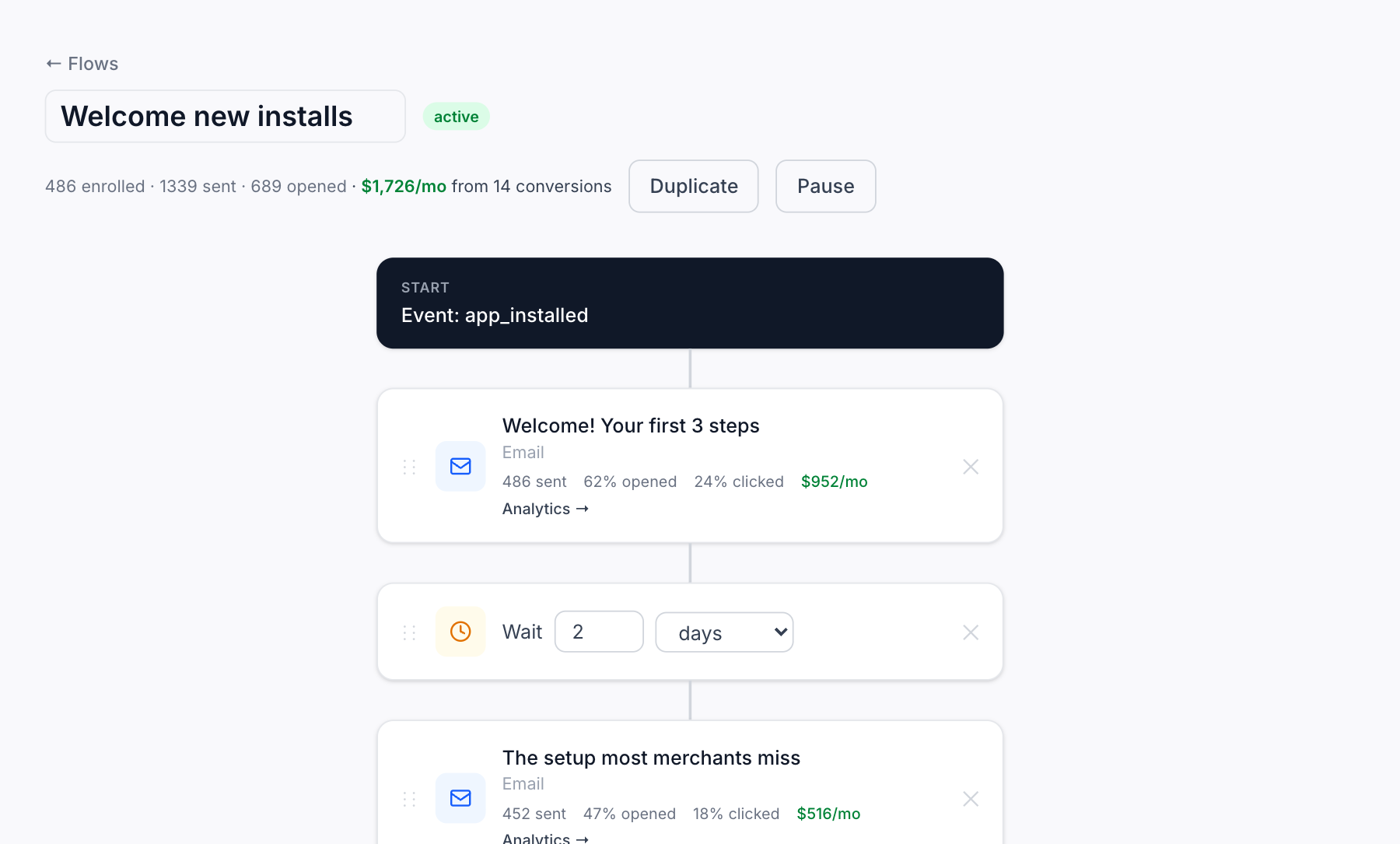
A welcome flow inside AppstorePulse: the trigger, each email and wait, and under every email its opens, clicks and the monthly revenue it brought in.
Try free to see it liveWhich plans include emails & flows
| Plan | What you get |
|---|---|
| Free | Not included. |
| Starter | Campaigns, flows and segments for up to 1,000 contacts, with 10,000 emails a month. |
| Pro | Up to 5,000 contacts and 50,000 emails a month. Need more? Raise your limit up to 50,000 contacts, from $80 a month. |
Frequently asked
Where do the merchant emails come from?
From your app. Shopify doesn't share merchant emails with partners, so your app adds each store as a contact with a few lines of code, or you import a CSV. We then match each contact to its store in your Shopify Partner data.
Do I need Revenue & Churn connected?
For billing segments and revenue per email, yes: connect your Shopify Partner account once. Campaigns and flows triggered by your own events work without it.
How is revenue attributed to an email?
When a store clicks an email and then subscribes, upgrades or comes back within 30 days, the email gets the credit. If it clicked several emails, the last one clicked gets it. An upgrade counts only the increase. Stores that start a trial show as potential revenue until their billing starts.
What counts as a contact?
A store you can email. Stores that unsubscribed don't count toward your limit.
What happens when I reach my limit?
We never charge you more on our own. You get an email at 80% and at 100%. New campaigns wait until you raise your limit or remove contacts, and your flows keep sending for 30 days so you have time to decide.